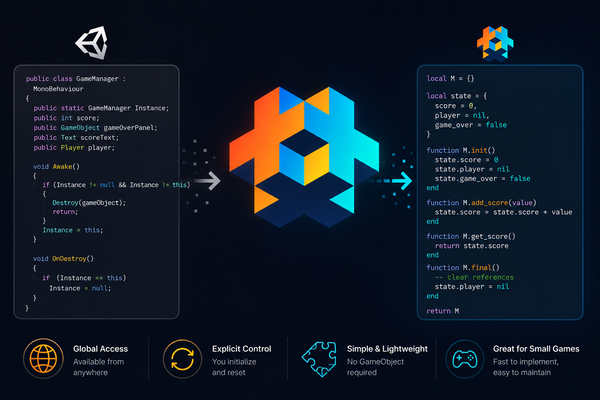
Unity to Defold: From GameManager Singleton to Lua Modules
In the previous post, we talked about how Unity developers often bring the multiple MonoBehaviour mindset into Defold, and how that can lead to overusing scripts and message passing.
In this post, we’ll look at another very common Unity pattern—especially in simple or one-scene games:
The GameManager Singleton
And how that idea translates naturally into Defold.
The Unity Pattern: GameManager Everywhere
If you’ve built small games in Unity (arcade, hypercasual, jam games), you’ve probably done something like this:
public class GameManager : MonoBehaviour
{
    public static GameManager Instance;

    public int score;
    public GameObject gameOverPanel;
    public Text scoreText;
    public Player player;

    void Awake()
    {
        if (Instance != null)
        {
            Destroy(gameObject);
            return;
        }

        Instance = this;
    }

    void OnDestroy()
    {
        if (Instance == this)
        {
            Instance = null;
        }
    }
}
Sometimes it grows into:
GameManagerScoreManagerUIManagerAudioManager
All accessible globally.
“Singleton is Bad”… but Is It?
In large-scale software, singletons are often discouraged.
But in small games?
They’re everywhere.
Why?
- Fast to implement
- Easy to access from anywhere
- Works well in a single-scene lifecycle
- Reduces setup overhead
So in practice:
For small games, singletons are often a pragmatic choice
Translating This to Defold
Defold doesn’t have MonoBehaviour, and you don’t attach scripts everywhere the same way.
But here’s the important part:
The pattern itself still works
In Lua, modules are naturally shared because of require() caching.
That means:
A Lua module can act like a singleton.
Simple Example: Gameplay State Module
Here’s a basic version:
local gameplay_state = {}

function gameplay_state.init()
    gameplay_state.score = 0
    gameplay_state.current_hp = 3

	print("gameplay_state init")
end

function gameplay_state.cleanup()
	print("gameplay_state cleanup")
end

function gameplay_state.decrease_hp()
    gameplay_state.current_hp = gameplay_state.current_hp - 1
end

function gameplay_state.add_score(amount)
    gameplay_state.score = gameplay_state.score + amount
end

return gameplay_state
Usage:
--- in your gameplay.script
local gameplay_state = require "modules.gameplay_state"

function init(self)
    gameplay_state.init()
end
This already behaves very similarly to a Unity singleton.
Important Difference: You Control the Lifecycle
In Unity:
- GameManager lifecycle is usually tied to the scene / GameObject
In Defold:
- Modules live as long as Lua state lives
- They do not reset automatically
So you must explicitly reset:
--- in your gameplay.script
function init(self)
	--- call it once
    gameplay_state.init()
end
And optionally clean up:
--- in your gameplay.script
function final(self)
    gameplay_state.cleanup()
end
A Better Version: Treat Module as API, Not Just Data
A common mistake is exposing variables directly:
gameplay_state.score = gameplay_state.score + 10 -- ❌ riskyA better approach:
local gameplay_state = {}

local state = {
    score = 0,
    current_hp = 3,
}

function gameplay_state.init()
    state.score = 0
    state.current_hp = 3
end

function gameplay_state.get_score()
    return state.score
end

function gameplay_state.add_score(value)
    state.score = state.score + value
end

function gameplay_state.decrease_hp()
    state.current_hp = state.current_hp - 1
end

function gameplay_state.is_gameover()
    return state.current_hp <= 0
end

return gameplay_state
Why This Pattern Works Well in Defold
Using modules like this gives you:
- Global access without message spam
- Simple state management
- Clear control points for logic
- Less dependency on GameObjects
It fits especially well for:
- Simple global state
- Flags (pause, game over, etc.)
The Trap to Avoid
Just like in Unity, this pattern can go too far.
Be careful not to turn your module into:
A hidden “God Object”
Avoid stuffing everything into one module:
-- ❌ Don't do this
gameplay_state.player
gameplay_state.enemies
gameplay_state.ui_nodes
Keep it focused on global state, not object behavior.
Key Insight
The singleton pattern itself exists in both Unity and Defold.
The difference is mostly in how developers commonly implement it.
In Unity, singleton-style systems are often built around:
MonoBehaviour- scene objects
- static
Instance - GameObject lifecycle
In Defold, the equivalent approach is often much simpler:
- plain Lua modules
- shared module state
- explicit initialization/reset
No GameObject is required unless you actually need one.
This makes Defold’s approach feel more lightweight and explicit, especially for small games.
Final Thought
The “GameManager Singleton” pattern doesn’t disappear when you move from Unity to Defold.
It simply becomes:
A Lua module with controlled state and functions
Singleton-style architecture is one of those patterns that is very easy to misuse, but also very easy to understand and work with, especially for small games.
That’s why despite all the warnings around singletons, many developers still use them.
In Defold, Lua modules make this approach feel very natural and lightweight.
The important part is not whether you use a singleton-like pattern or not, but:
Understanding the scope and complexity of your game
A simple architecture that fits your project is often better than an overly “correct” architecture that slows development down.
In upcoming posts, we’ll explore other ways to structure game logic in Defold. Thanks for reading!